The idle games that work best on a phone and a PC are the ones that keep one save across both. Melvor Idle and Idle Slayer do it with their own cloud accounts, Antimatter Dimensions lets you carry a save as text, and browser games like ours play anywhere you can open a web page. Below are the three ways this works and the picks we'd point a friend to.
What's the short answer?
Look for two things: the game runs on both devices, and it has a way to move your progress between them. Lots of idle games pass the first test and fail the second, which leaves you with two separate runs that never meet.
Idle games suit this split well: set up a long goal on your PC in the evening, then check in on your phone at lunch.
What are the three ways to play one idle game on both?
| Way | How it works | The catch |
|---|---|---|
| A browser game | Same web address on PC and phone, nothing to install | The save often lives in that one browser unless you sign in |
| A cloud account | You log in on each device and the save follows you | Needs an account, and the game has to sync before you switch |
| Store versions | Separate PC and phone releases (Steam, App Store, Google Play) | You may have to buy it twice, and saves don't always cross over |
1. Play it in a browser
The simplest route: open the same page on your laptop and your phone. The trap is that many browser games keep your save in the browser itself. Two devices then means two saves, and clearing your browser data can wipe one.
2. Sign in to a cloud save
This is the one that gives you a single run. The game keeps your save on its server, you sign in on each device, and you pick up where you stopped. Let the game save (or close it properly) before you switch, so the other device loads your latest progress.
3. Get the store versions
Some idle games have a Steam release and phone apps. Check two things first: whether buying on one store unlocks the other, and whether the save moves with you. A few games instead let you export your save as a text string and paste it into the other version, which works but is a manual chore.
Which idle games work on both phone and PC?
Games we checked, and how each one moves your save. Save systems can change, so look at the game's own page before you commit a long run.
Melvor Idle
An idle RPG inspired by RuneScape, where you train skills and fight your way through dungeons. It is on the web, Steam, iOS and Android, and a free Melvor Cloud account lets you play the same save across all of them. The mobile versions are free to try with a purchase for the full game, and the official wiki says buying on Steam also gives you the full version on mobile and in the browser (buying on mobile does not give you a Steam copy).
Best for: you want depth and a save that goes everywhere.
Idle Slayer
An incremental RPG by Pablo Leban: you grow from nothing into a slayer, collect souls, craft gear and fight bosses. It is on Steam, Google Play and the App Store, and its Steam page says you can carry on with the same save on PC and mobile. If you like it, our guide to games like Idle Slayer has more in the same vein.
Best for: you like playing both actively and idle.
Antimatter Dimensions
A pure numbers incremental that began in 2016 as a web game by Hevipelle and later came to Steam. There is also a native Android app. Its saves can be exported as text from the options and imported on another version, and the Android version's saves are compatible with the browser version. Steam and Android use different cloud save systems, though, so moving between those two is the copy and paste route.
Best for: you love big numbers and layered resets.
Clicker Heroes
The classic idle game from Playsaurus where you slay monsters and upgrade heroes, on web browsers, Windows, macOS, iOS and Android. The Clicker Heroes blog says a free Playsaurus account gives you cloud saves and syncing between devices, such as a browser at work and Steam at home. The same blog also says save files can't be imported between Steam and mobile, so if your plan is specifically PC to phone, check that the account sync covers your setup.
Best for: you want a well-known clicker.
Cookie Clicker
One of the best-known idle games, by Julien "Orteil" Thiennot. It plays in a web browser and is also on Android and on Steam for Windows and macOS. We didn't find a source we trust on moving one save between those versions, so treat it as a great game to have on both, with separate runs.
Best for: you want the original.
Kittens Game
A text-based village game where you run a village of kittens, produce resources and trade. Its own site calls it "a Dark Souls of incremental gaming". It plays in a browser at kittensgame.com, with apps for Android and iOS linked from the same page.
Best for: you like slow, deep planning and don't mind lots of text.
Hoard Road (ours)
Hoard Road is the game we make, so read this one knowing that. It's a free pixel-art idle adventure: your hero runs an endless road and fights on their own, while you choose upgrades, take on guardians and raise your pals.
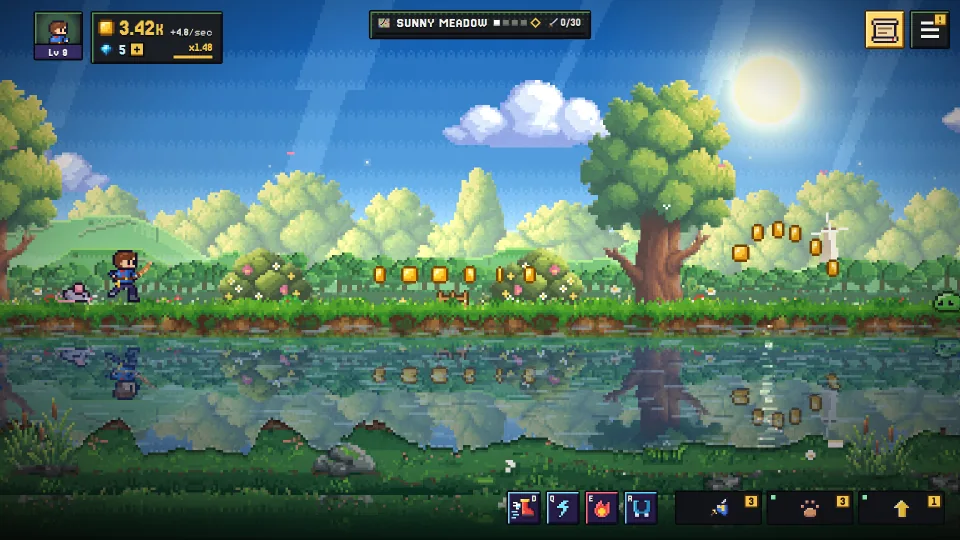
It fits the browser route and the cloud route at once:
- It plays in a browser on a PC or a phone at playhoardroad.com/play. No download, and starting needs no sign-up.
- One save on both. Sign in with Google or Discord in Settings and the save follows you between PC and phone, including the iPhone and Android apps (the iPhone app offers Apple too). Without signing in, the save lives only in that browser on that device, so sign in before you switch.
- It feels like an app on a phone. Add it to your home screen (Safari: Share, then Add to Home Screen; Chrome: menu, then Install app) and it opens full screen and plays offline.
- It earns while closed. Your pals keep earning (25% of their coins for up to 8 hours at first) and Expeditions run by the clock, so a gap between sessions still pays.
It works with mouse and keyboard, a controller or touch. It's on the App Store for iPhone and on Google Play for Android too, and a Steam version is coming, with no release date yet. The getting started page covers the first ten minutes.
How do I pick the right one?
- You switch devices every day: choose a game with a cloud account (Melvor Idle, Idle Slayer, Hoard Road).
- You can't install things on your work PC: choose one that plays in a browser (Melvor Idle, Antimatter Dimensions, Kittens Game, Hoard Road).
If saves are the part you care about most, our guide to keeping one save on PC and phone goes deeper on how syncing works, and free idle games in your browser lists more you can open right now.
Questions
Can I play the same idle game on my phone and my PC?
Yes, if the game runs on both and has a way to move your save. A cloud account is the easiest, since you just sign in on each device. Browser games run on both, but without an account the save usually stays in one browser.
Do browser idle games work on a phone?
Many do, since a phone browser can open the same page as your PC. Some are built for a big screen and feel cramped on a phone, so try a few minutes before you settle in. Hoard Road is made to play on both, with touch controls.
Do I have to buy an idle game twice for PC and phone?
It depends on the game. Some free games cost nothing on either, and some paid ones unlock both with one purchase. Melvor Idle, for example, gives Steam buyers the full game on mobile and in the browser, but not the other way round.
Will my offline progress carry over when I switch devices?
With a cloud save it usually does, because the earnings are worked out from your saved progress, whichever device you open next. Avoid playing on two devices at once: one save will overwrite the other.
Which is better on a phone, an app or a browser game?
Apps can feel smoother, while browser games need no install and no store. On many phones you can add a browser game to your home screen so it opens like an app.
Hoard Road is free in your browser, so the quickest test is to start a run on your phone, sign in, and open it on your PC.