The idle games that run best on a Chromebook are the ones that live in a browser tab: Cookie Clicker, Universal Paperclips, Kittens Game and Antimatter Dimensions all play in Chrome with nothing to install. A Chromebook is built around the browser, and most idle games are light pages of numbers and buttons, so the two fit together well. If your Chromebook has the Google Play Store, a few of them also come as Android apps.
Why do idle games suit a Chromebook?
Chromebooks are laptops that run ChromeOS, and they're made with the web in mind. Idle games happen to be one of the genres that grew up on the web: Cookie Clicker started in 2013 as a browser game written in JavaScript, and plenty of idle games since have followed it into the browser.
That match helps in a few practical ways:
- No install, no storage worries. A browser idle game is a web page, so there's nothing to download and nothing filling up your drive.
- Low demands. Most idle games are numbers, buttons and small pictures. They don't need a graphics card or a fast processor to feel smooth.
- Short sessions are the point. You open the game, make a few choices, and close it again. That suits a laptop you pick up between other things.
- Closing the lid costs you little. Many idle games work out what you would have earned while you were away and pay you when you come back, so shutting the Chromebook doesn't throw your progress away.
How can you play idle games on a Chromebook?
There are three ways, and the first one works on nearly every Chromebook.
| Way | What you need | Good to know |
|---|---|---|
| In a Chrome tab | Just the game's address | The simplest option. Bookmark it and you're done. |
| As a web app | Chrome's menu: Cast, save, and share, then Install page as app | The game gets its own window and an icon in your Launcher. |
| As an Android app | The Google Play Store | Only some Chromebooks have it, and school or work ones may not allow it. |
In a tab is where most idle games are happiest. There's nothing to set up, and the game updates itself every time you load it.
As a web app, a site opens in its own window instead of a tab, and you find it in the Launcher like any other app. Google's help notes that some web apps can also store more for offline use, though not every one works fully without a connection. It's a nice option for a game you open every day, because it stops it getting lost among your tabs.
As an Android app, you install from the Play Store the same way you would on a phone. Google says the Play Store is only available on some Chromebooks, and that on a school or work Chromebook you might not be able to add it at all. Android apps you install also belong to the account that signed in first on that Chromebook.
Where does your save go on a Chromebook?
This is the part people trip over. Most browser idle games keep your save in the browser itself, on that Chromebook, under that account. Switch accounts, use a different device, or clear your browsing data, and the save may not come with you.
Two habits keep it safe:
- Use the game's export or cloud save if it has one. Many idle games let you copy your save as text or sign in to keep it online.
- Play on one account. If you share a family Chromebook, stick to your own sign-in so your save is always where you left it.
If you want the same save on a Chromebook and a phone, our guide to idle games with one save on PC and phone covers what to look for.
Which idle games run well on a Chromebook?
Every pick here plays in a browser, so it runs in Chrome on a Chromebook with no download. They're quite different from each other, so read the line on each and pick the one that sounds like you.
Cookie Clicker
The classic, made by the French developer Julien "Orteil" Thiennot. You click a giant cookie, then spend cookies on buildings and upgrades that bake for you. It has no clear ending, so you can keep it going as long as you like. Besides the browser version, there's also an Android version, which is handy if your Chromebook has the Play Store. If you like it, we've collected games like Cookie Clicker.
Universal Paperclips
Made by Frank Lantz of New York University and released in 2017. You play an AI built to make paperclips: you start by clicking a button for one clip at a time, then sell them to fund machines that make clips for you. Each time growth stalls, you have to invest in a breakthrough to reach the next phase. Unusually for an idle game, it has an ending, so it's a good pick if you want a whole story in a few sittings.
Kittens Game
A browser game by bloodrizer. You start as a kitten in a catnip forest and slowly grow a tiny settlement into an advanced civilization. It's slow to start and gets very deep, so it suits someone who enjoys planning and is happy to be patient early on.
Antimatter Dimensions
Made by the Finnish developer Hevipelle. You spend antimatter on "dimensions", and each dimension produces copies of the one below it, so your growth stacks up fast. It has several layers of resets and unlocks, which makes it a good next step once you understand prestige. It plays in a browser and is also on Android and Steam.
Hoard Road (ours)
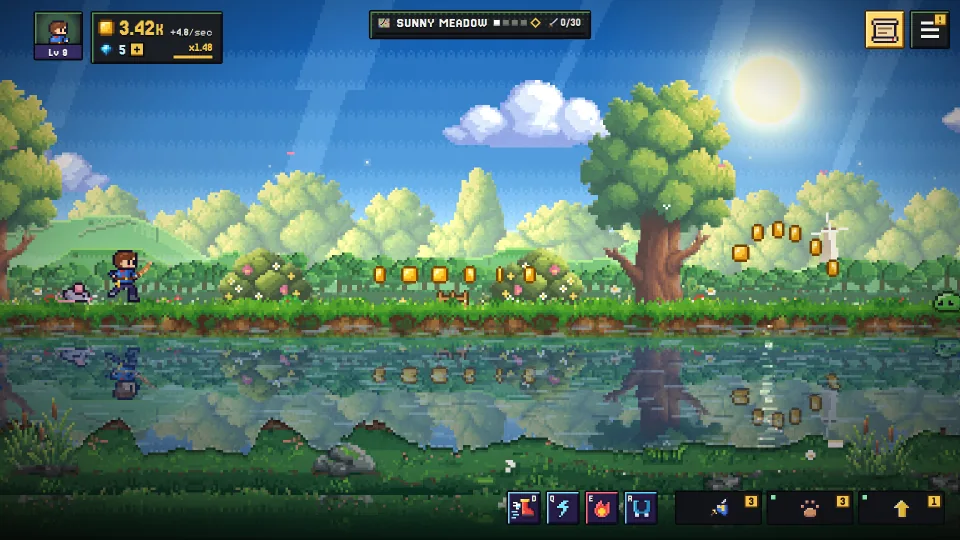
Hoard Road is the game we make: a free pixel-art idle adventure. Your hero runs an endless road and fights on their own, while you choose the upgrades, jump for coins, take on the guardians and raise your pals. There are twelve lands to cross, and each one ends with a guardian.
A few things matter on a Chromebook specifically:
- It runs in Chrome at playhoardroad.com/play. No download, and starting needs no sign-up.
- It can sit in your Launcher. Chrome's Install page as app works on our site like any other, so the game gets its own window.
- Any controls you have work. Keyboard and mouse, a touchscreen, or a controller.
- Closing the lid isn't the end of the run. While the game is closed, your pals keep earning a share of their coins (25% for up to 8 hours at first, and the Star Map and other upgrades raise both), and Expeditions keep running by the clock. The hero waits for you on the road.
- Your save can follow you. Sign in with Google in Settings and the same save carries between your Chromebook and your phone. Without signing in, it stays in that browser on that device.
If you'd like a hero and a road rather than a cookie, it's free to try in a Chrome tab right now.
Questions
Can you play idle games on a school Chromebook?
A school Chromebook is managed by the school, and its administrator decides what it can run, including which Android apps you can install. If a game isn't available, that's the school's call, so save your idle games for your own device or for home. Idle games are made for short visits anyway, so they fit well around the rest of your day (we have picks for short breaks too).
Do idle games keep running when you close a Chromebook?
Usually the game itself stops when the lid closes or the tab shuts. Most idle games make up for it by working out what you would have earned and paying you when you return, often a share of your normal rate for a limited time. Our guide to how offline earnings work explains the details.
Do you need the Google Play Store to play idle games on a Chromebook?
No. Browser idle games need nothing but Chrome, which every Chromebook has. The Play Store only matters if you want the Android version of a game, and it isn't available on every Chromebook.
Will you lose your idle game save if you clear your browsing data?
You can, for games that keep their save in the browser. Before clearing anything, export your save if the game offers it, or sign in to the game's cloud save. For more browser picks that need no install, see idle games with no download.