To use a Hoard Road code, sign in first, then open Menu > Settings > Redeem a code and type it in. Codes bring gems and looks, and they come from events, partners and creators.
One thing up front: this page explains how codes work. It doesn't list codes. We'd rather not post a list that goes out of date the week after it's written, so below we point you to the places where real, current codes show up.
The short answer
- Where: Menu (the three bars, top right) > Settings > Redeem a code.
- Before you start: sign in with Google or Discord. A code won't go in without it.
- What you get: gems, looks, or both.
- Where codes come from: events, partners and creators. Watch the Hoard Road Discord, our news page and the people who make videos and streams about the game.
How to redeem a code
It works the same way on a PC or a phone.
- Open the game at playhoardroad.com/play (or from your home screen if you added it there).
- Open the Menu. That's the three bars in the top right corner. On a keyboard, pressing Esc with nothing else open takes you straight to Settings; on a controller, Start does.
- Sign in. In Settings, go to Cloud save and sign in with Google or Discord. If you're already signed in, skip this.
- Choose Redeem a code, type the code, and confirm.
That's the whole path, in the game's own words: sign in, then Menu > Settings > Redeem a code. The getting started page on our wiki says the same thing in its "Good to know" list, if you want it handy.
Signing in does more than unlock codes. It turns on cloud save, so your save follows you between your computer and your phone. Without signing in, your save lives only in the browser you're playing in, on that one device. If you play in more than one place, our guide to idle games with one save on PC and phone explains why that matters.
What can a code give you?
Codes bring two kinds of things:
| Reward | What it's for |
|---|---|
| Gems | Spending in the Gem Shop |
| Looks | Changing how things look in the game |
What a particular code gives depends on the code. An event code and a creator's code won't necessarily match, and we'd rather not promise amounts here that might change.
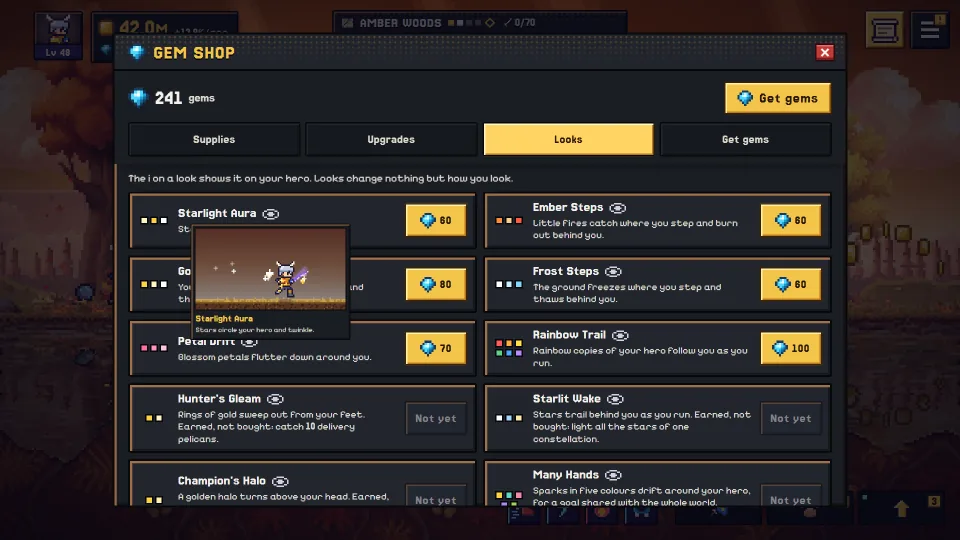
Codes are a nice extra, not the main way to get gems. You earn gems just by playing, and the Gem Shop's Get gems tab has a small free gem pack once a day. There's also a daily gift waiting each day you come back, and a missed day's gift waits for you, up to 6 missed days (only the days-in-a-row bonus starts over). Our guide to earning gems for free goes through all of it.
Where do new codes come from?
Hoard Road codes come from three places:
- Events. When something is happening in or around the game, a code can come with it.
- Partners. People and places we work with sometimes share a code with their audience.
- Creators. If someone you watch makes videos or streams about Hoard Road, their channel is where their code will turn up.
So the places to keep an eye on are:
- The Hoard Road Discord. The easy way in: sign in to the game with Discord, and that also adds you to the Hoard Road Discord. If you already signed in with Google, you can link Discord in Settings > Cloud save.
- Our news page on playhoardroad.com.
- The creators page, and the creators themselves.
If you find a code anywhere else, treat it with a little caution. It may be real, but it may also be old, mistyped, or made up.
Why didn't my code work?
Almost every failed code comes down to one of these. Check them in this order:
- You're not signed in. Codes need a signed-in save. Open Settings > Cloud save, sign in with Google or Discord, then try again.
- It's typed wrong. Capital letters don't matter, but every character does. Look for a missing one, or letters that look alike (an O and a zero, an I and a 1). Copying and pasting the code is the safest way.
- It's already been used. If you've redeemed a code before, it won't pay out a second time.
- It's expired. Codes from events and partners can run for a limited time. If a code is from an old video or post, it may simply be over.
- It's used up. Some codes can only be redeemed a set number of times in total, and once they're gone, they're gone.
One more thing: each account gets only a few tries an hour, right or wrong (that keeps people from guessing codes). If you've had several misses in a row, wait a while before you try again.
If you've checked all of these and you're sure the code is fresh, ask where you found it (the creator, the event post, or the Discord). Whoever shared it will know whether it's still live.
Questions
Is there a list of working Hoard Road codes?
Not on this page, on purpose. Codes come and go, and a list goes stale fast. For current codes, watch the Hoard Road Discord, our news page and the creators who play the game.
Do I have to sign in to redeem a code?
Yes. Sign in with Google or Discord in Settings > Cloud save, then use Redeem a code. Signing in also turns on cloud save, so your progress follows you between PC and phone.
Can I redeem a code on my phone?
Yes. The path is the same on a phone as on a PC: Menu > Settings > Redeem a code, once you're signed in. Hoard Road plays in a phone's browser, and you can add it to your home screen so it opens full screen.
Are codes the only way to get free gems?
No. You earn gems by playing, the Gem Shop has a small free gem pack once a day in its Get gems tab, and there's a daily gift each day you come back. Codes are a bonus on top of that.
What does a code give me?
Gems, looks, or both, depending on the code. Gems are for the Gem Shop, and looks change how things look in the game. If you haven't started yet, Hoard Road is free to play in your browser, and our beginner's guide covers your first hour on the road.